



www.revolution.be
(c) 2011 Kris Verlent


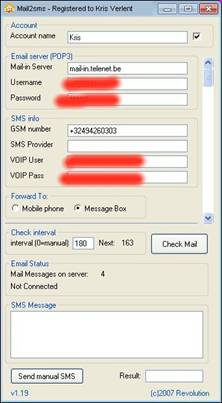
Features:
- Forward multiple Mail-in POP3 accounts
- Configurable Check-Mail interval
- Send SMS's through any attached GSM/GSM modem.
- Works also with VOIPBuster or Netappel accounts to send cheap SMS,
even worldwide, without the need of a GSM modem.
- Individual Spam filter for Sender, Subject and Body text.
- Button to manually send an SMS.
- Choice between sending an SMS or alert new mails with a popup window.
- Settings can be adjusted from abroad by sending an email to yourself with
the new settings.
- Configurable number of SMS blocs to send (160 chars/bloc)
Requirements:
- PC with Windows XP
- GSM with PC connection or GSM Modem
or
An account with an internet SMS provider like e.g. VoipBuster
- Mobile phone with SMS capabilities to receive your forwarded mails.
No internet service or WAP or whatever is necessary on your mobile phone!
Any prepaid card or subscription will do.
- Forward multiple Mail-in POP3 accounts
- Configurable Check-Mail interval
- Send SMS's through any attached GSM/GSM modem.
- Works also with VOIPBuster or Netappel accounts to send cheap SMS,
even worldwide, without the need of a GSM modem.
- Individual Spam filter for Sender, Subject and Body text.
- Button to manually send an SMS.
- Choice between sending an SMS or alert new mails with a popup window.
- Settings can be adjusted from abroad by sending an email to yourself with
the new settings.
- Configurable number of SMS blocs to send (160 chars/bloc)
Requirements:
- PC with Windows XP
- GSM with PC connection or GSM Modem
or
An account with an internet SMS provider like e.g. VoipBuster
- Mobile phone with SMS capabilities to receive your forwarded mails.
No internet service or WAP or whatever is necessary on your mobile phone!
Any prepaid card or subscription will do.
Download here our latest version of Mail2sms.
Mail2sms
Forward your incoming emails to your Mobile phone as an SMS message.
Forward your incoming emails to your Mobile phone as an SMS message.